About: This post is about using Angular Libraries with Siebel Open UI Framework. The obvious advantages of bringing in Angular with Siebel are :
The Idea of using Angular with Siebel came to me while I was working on the development of Siebel IPAD application and I had to write more than 20,000 lines of PR code to implement some UI/UX and functional requirements. I discussed this with our UI/UX designer if We can bring in some 3rd Party library with Siebel Open UI and We realized that it was possible. I was able to find some awesome tutorials by Duncan Ford to include 3rd Party libraries or Jquery Plugins with our PM/PR but unfortunately just doing this will not work in case of Angular. You can Check out the below video to get an idea:
While implementing angular using this technique I was unable to bind the angular app with the library. However, I observed one strange thing that my Angular structure was working fine if I include Angular URL from Google CDN. But if I include the locally hosted Angular.js file the App was not behaving as expected. It took me some time and some help from Angular experts (my Sister :p ) to realize that there was more to it. We will discuss this implementation with the help of two examples. First We will develop a small sample Angular Dom and make it work with Siebel, and then We will discuss how to develop a Todo List using Angular JS.
Using Angular in Siebel:
The first thing that We need to start with it is to get the Angular Library downloaded to our Siebel Public folder for local hosting. We can definitely use the CDN libraries hosted by Google or Microsoft but these won't work on intranet network especially where users don't have access to the public internet.
Resources Needed:
Steps:
1. We will build a small Angular Dom or HTML content like below:

Sample Angular Application - Todo List on Siebel Home Page:
Now since We know how to use Angular in Siebel. We will develop a small app to manage Todo List on Siebel Home Screen. This is an Angular Application to show, add, delete today's Tasks of Logged In User on Homepage as ToDo List Reminder. The Application queries, add and deletes today's Activities using Siebel Business Service and Workflows.
Resources:


The video below will show you the navigation journey and usage of this small Angular App with Siebel on an Android Device. Enjoy the video and do let me know if you have implemented or have ideas to develop such Angular apps for your Siebel Application.
- It Provides a good MVC structure as compared to using only Jquery.
- It is intuitive, comprehensive and timesaving.
- Provides a better control of data as the data binding is easier.
- It will open up the possibilities of having small Angular Apps integrated with Siebel Application. For example Todo List on HomeScreen, Weather Updates, Interactive Dashboards etc..
The Idea of using Angular with Siebel came to me while I was working on the development of Siebel IPAD application and I had to write more than 20,000 lines of PR code to implement some UI/UX and functional requirements. I discussed this with our UI/UX designer if We can bring in some 3rd Party library with Siebel Open UI and We realized that it was possible. I was able to find some awesome tutorials by Duncan Ford to include 3rd Party libraries or Jquery Plugins with our PM/PR but unfortunately just doing this will not work in case of Angular. You can Check out the below video to get an idea:
While implementing angular using this technique I was unable to bind the angular app with the library. However, I observed one strange thing that my Angular structure was working fine if I include Angular URL from Google CDN. But if I include the locally hosted Angular.js file the App was not behaving as expected. It took me some time and some help from Angular experts (my Sister :p ) to realize that there was more to it. We will discuss this implementation with the help of two examples. First We will develop a small sample Angular Dom and make it work with Siebel, and then We will discuss how to develop a Todo List using Angular JS.
Using Angular in Siebel:
The first thing that We need to start with it is to get the Angular Library downloaded to our Siebel Public folder for local hosting. We can definitely use the CDN libraries hosted by Google or Microsoft but these won't work on intranet network especially where users don't have access to the public internet.
Resources Needed:
- Angular 1.6.9 library or any Angular 1 library
- https://code.angularjs.org/ - Download the Zip and extract in PUBLIC\enu\23044\scripts\siebel\custom\
- PR to load on some Applet
- https://drive.google.com/file/d/191bjJbLl-gECLmtvhoZEUmCwV60c4MOv/view?usp=sharing
- This PR was written by me for Contact Form Applet
- Angular DOM structure
- I have taken this DOM example from W3 schools https://www.w3schools.com/angular/tryit.asp?filename=try_ng_default
- This DOM is already included in the PR above
- Angular Controller logic
Note: After you download the PR and controller do check the comments in the code. As it will give you an idea how this whole thing is working.
1. We will build a small Angular Dom or HTML content like below:
<div ng-app="">
<p>Input something in the input box:</p>
<p>Name : <input type="text" ng-model="name" placeholder="Enter name here"></p>
<h1>Hello {{name}}</h1>
</div>
Refer W3School Tutorial link provided above
Refer W3School Tutorial link provided above
2. We need a Physical Renderer on an Applet (angularDemoPR.js already provided) where We will use his DOM to append or replace it with the Applet DOM. The code to do that will be written after the ShowUI event of PR. The PR given in the link is for Contact Form Applet.
3. Once We are ready with this We will have to write a controller (ngDemoController.js already provided in the above links) which is to be loaded with the Angular DOM to be attached with our Siebel Page. This is an important part as it binds the Angular DOM with the library and without this, the Application won't work if Angular is hosted locally.
4. Register the PR on Manifest Administration Screen.

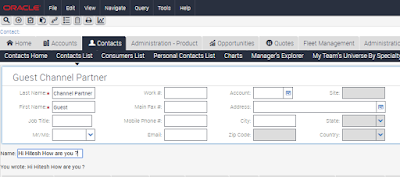
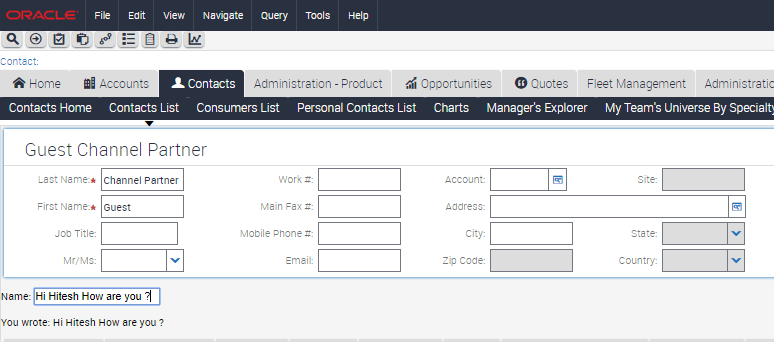
5. Log out of the application and Logn in, Navigate to the applet which is associated with the PR. Start typing in the input box and the content will appear below it in real time.
Sample Angular Application - Todo List on Siebel Home Page:
Now since We know how to use Angular in Siebel. We will develop a small app to manage Todo List on Siebel Home Screen. This is an Angular Application to show, add, delete today's Tasks of Logged In User on Homepage as ToDo List Reminder. The Application queries, add and deletes today's Activities using Siebel Business Service and Workflows.
Resources:
- PR on Activity List Applet on Home Page.
- Angular HTML Template
- Controller JS
- Business Service or Workflow to fetch, Add, Delete data from Action BC and pass it to the controller.
- We can define our own logic to do these operations.
Now once We have all the resources We have to place these files in public Folder Structure and register it in Siebel Manifest Screens to allow it to load with the Applet. Check the Snapshots below to get an idea.


Once We are done with the setup We have to log out and re Login to view the changes. The snapshot below shows how the Todo list will appear on Siebel HomePage.

The video below will show you the navigation journey and usage of this small Angular App with Siebel on an Android Device. Enjoy the video and do let me know if you have implemented or have ideas to develop such Angular apps for your Siebel Application.
Thanks for reading the post. If this post helps you in any way Do comment below and let me know how it helped you.